


Reconcile Reimbursements
Reconcile Reimbursements
Reimbursement reconciliation helps you match each reimbursement payment to the bank withdrawal it creates, then trace that payment back to the expense report it covers. You can review and verify these payments directly in Expensify.
Who can reconcile reimbursements
Workspace admins and payments admins can use the Bank reconciliation report to reconcile reimbursements when Payments is enabled on the workspace with a verified business bank account.
How to view reimbursement withdrawals
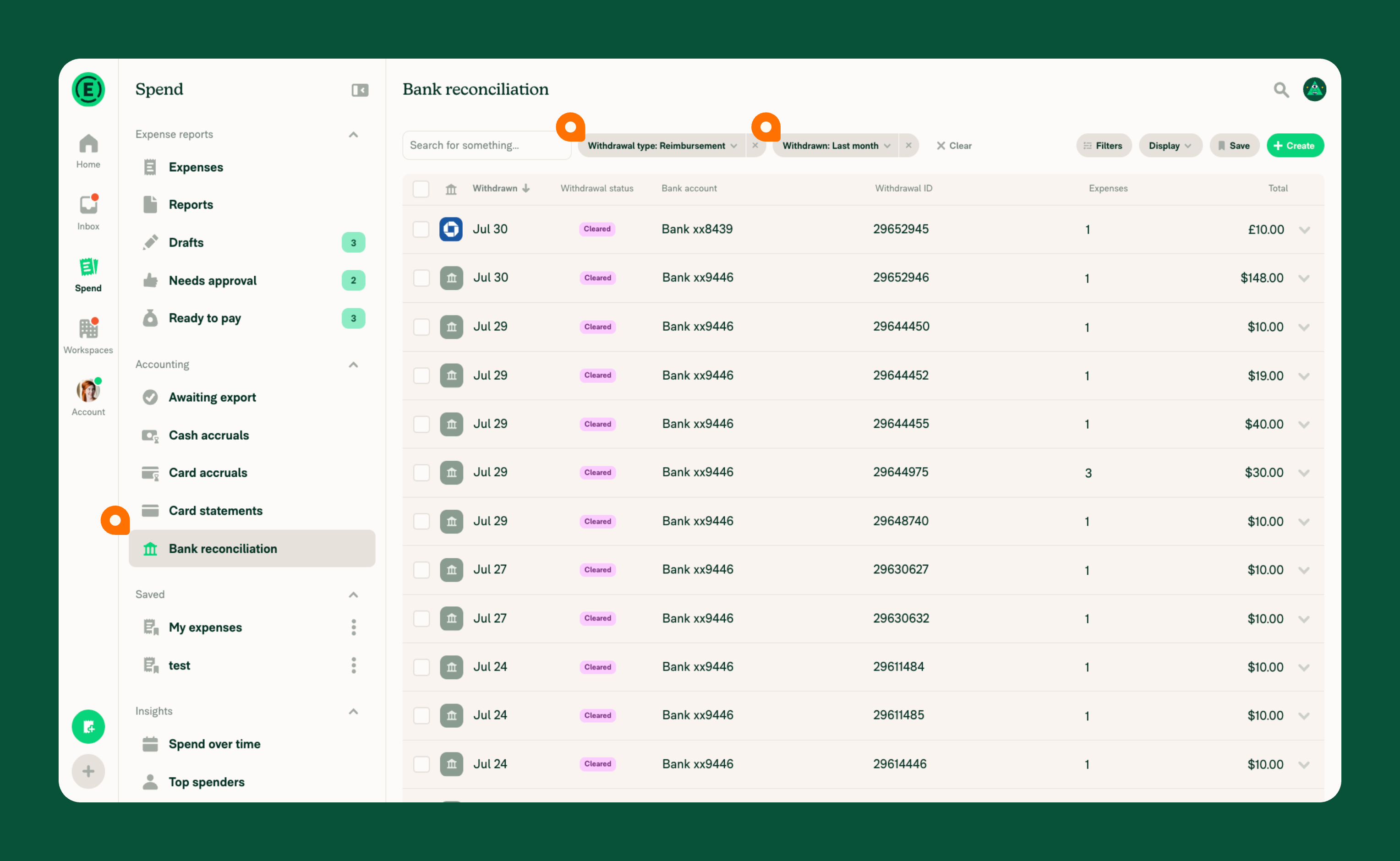
- Click the navigation tabs (on the left on web, on the bottom on mobile) and go to Spend.
- In the Accounting section, select Bank reconciliation.
- Select the Withdrawal type filter and choose Reimbursement.
- Select the Withdrawn filter to choose a date range (for example, Last month).
- Review the list of reimbursements. Each row represents a reimbursement for a single report and shows the total amount.
How to read the Amount debited and Amount reimbursed columns for cross-border reimbursements
A cross-border reimbursement debits your company in one currency and pays the employee in another, so a single total cannot describe it. When your selected results include at least one cross-border reimbursement, the reconciliation view shows two additional columns between Expenses and Total:
- Amount debited — the amount withdrawn from your company’s bank account, shown in the settlement currency.
- Amount reimbursed — the amount deposited to the employee, shown in the employee’s deposit currency.
If every reimbursement in view is domestic, these columns are hidden entirely. In a mixed list, domestic rows leave both cells blank and show their amount in the Total column. You can sort the list by either column by clicking its header.
How to trace a reimbursement payment to expense reports
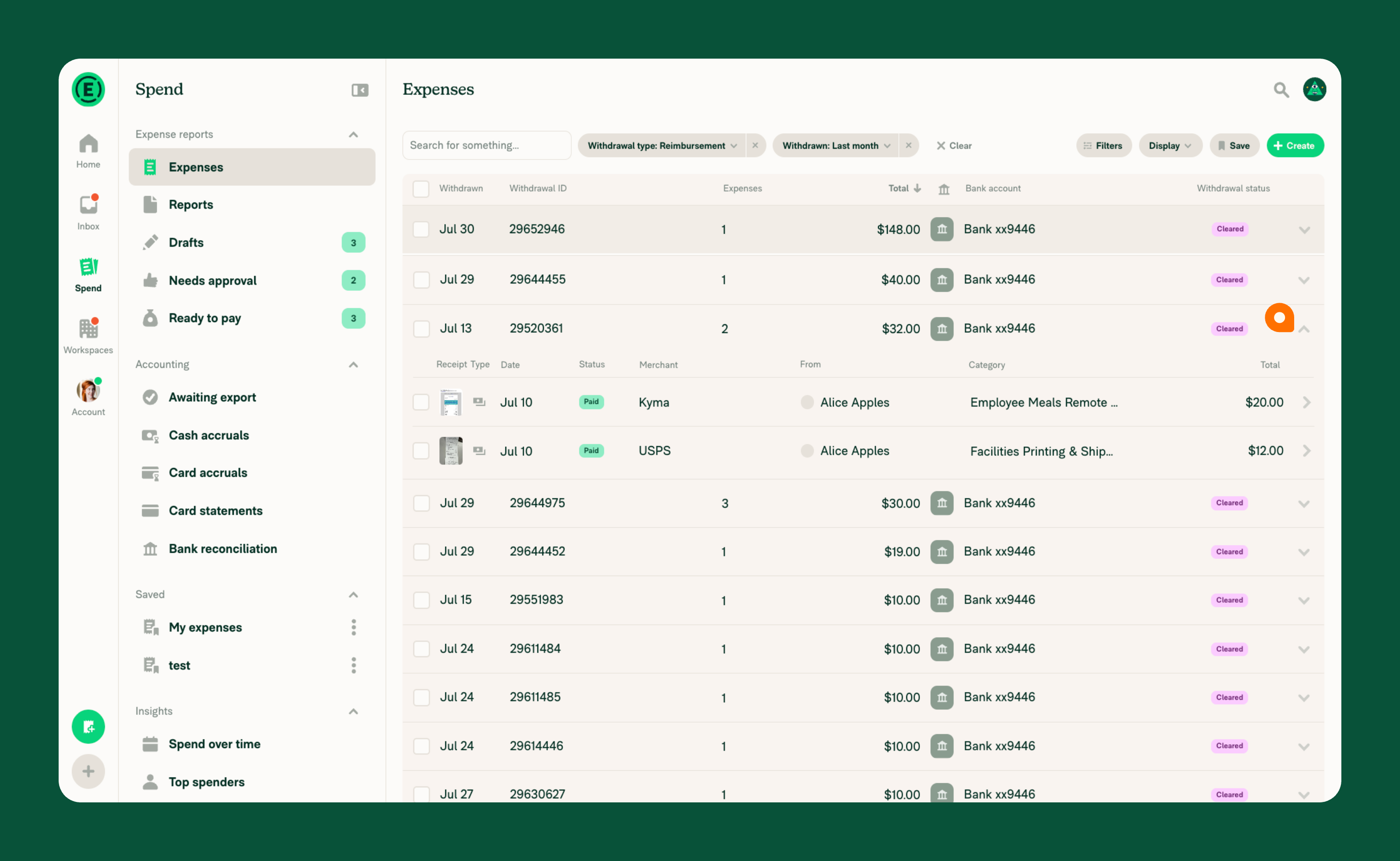
- From the Bank reconciliation report, locate the payment you want to investigate.
- Click the arrow next to the reimbursement amount to expand the row.
- Review each report to confirm the payment matches expected activity.
How to verify reimbursement totals against your bank statement
- On your bank statement, locate the reimbursement charges for the period you are reconciling.
- In the Bank reconciliation view, compare each payment total to the corresponding charge on your bank statement.
- If the totals match, the reimbursement is reconciled.
- If a total does not match, expand the reimbursement to review the underlying expenses and identify discrepancies.
How to export reimbursement withdrawals from Bank reconciliation to CSV
- From the Bank reconciliation report, check the box next to each reimbursement you want to export, or use the top checkbox to select all.
- Click the selection button at the top (for example, 1 selected).
- Select Export. If Export is the only action available, the export options are already listed under an Export heading—skip to the next step.
- Select Current view.
In the exported file, each reimbursement appears as its own section. The reimbursement row uses the columns shown in the Bank reconciliation view, such as Withdrawn, Withdrawal status, Bank account, Withdrawal ID, Expenses, and Total. The expenses in that reimbursement are listed below it.
Amount debited and Amount reimbursed are included only when they appear in the view, which happens when your selected results include at least one cross-border reimbursement.
FAQ
How do I identify an unknown bank charge?
If you see a charge on your bank statement that you cannot identify, go to the Bank reconciliation view and filter to the date range when the charge occurred. Match the charge amount to a payment in the list, then expand it to see which report(s) were reimbursed.
What does a reimbursement payment include?
A single reimbursement payment covers one expense report. Expanding the payment row shows all the expenses on the report that was reimbursed.
Why don’t I see the Amount debited and Amount reimbursed columns, or why are they blank?
Those columns apply only to cross-border reimbursements, where the debited and reimbursed amounts are in different currencies. If your selected results contain only domestic reimbursements, the columns don’t appear at all. In a mixed list, domestic rows leave both cells blank because the amount is shown in the Total column instead.
Why don’t I see Reimbursements in the Withdrawal type filter?
The Reimbursements option only appears when your workspace has Payments enabled with a verified business bank account. If you don’t see it, confirm that the Payments is enabled and a verified business bank account is connected.


